
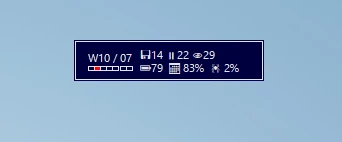
A unique approach to avoid forgetting to track time. Many users forget to stop the timer when they change the context and task. This application will ask you every 15 minutes what you have just worked on. There are configurable timers for breaks, e.g. Pomodoro, eye break, stretching; reporting and automation; widgets (e.g. CPU usage, battery level), and application launcher. This tool will help you focus on your priorities.
Features

Discreet widget
The application runs as a widget on your desktop and as a tray icon in the taskbar.
Highly configurable
Change the theme and choose data to be displayed on the ticker.

Track time with confidence
Every 15 minutes a window pops up, asking you to select the task or project you worked on in the past quarter.
You can check the tasks you worked on recently, today, this week or this month along with visual information about time spent on each. And you see at what times you've worked today.
If you forget what you've been doing, you can take a look at the recording of applications you've used.
You can also add bulk time for the past or future time in case you've been e.g. in a meeting or away from the computer.
And every time logged can include tags that determine after aspects of your work, e.g. location, billability, health conditions, etc.

Break from the screen
You can configure breaks from the screen to save your sight. Each can be skipped or postponed in case you can't stop your work at the moment.
Create breaks to work in Pomodoro style, get breaks for the 20/20/20 eye rule or for stretching.

Reporting
You can analyze how you spent your time at the computer in any period.

Automation
You can set the application to suggest tasks depending on what applications you had open, set time limits and budgets, make the application launch your environment to proceed work on a given project or even forcibly close an application if you overdo (be it social media or pet project).

Notifications and reminders
Get periodic notifications with selected information, like the current day, given word, battery level, etc.
Why Work Time?
Get reminded of recording time
It's not your duty to remember to stop and start timers for the tasks you work on. This application will remind you.
Get means to fight procrastination
You see budgets while you record time, so it's easy to notice when you spend too little or too much time on important tasks. With automation, you can minimize the effort to start a productive job and kill applications you oughtn't to be using that much.
Improve your life
Analyze how much time you waste on distracting activities, see your progress of standing at the desk instead of sitting, and get healthy breaks from the computer.
Plan next week
Set budgets for the upcoming week to focus your energy on the priority projects.
Roadmap
-
Plugins to show even more data in notifications and reminders, e.g. quizzes, trivia, weather.
-
Option to work in the old start and stop timer style.
-
Mobile application.
-
Time tracking for teams.